From Technical Complexity to a Clear Interface with AI
Exploring how AI can support the design of a technical diagnostics interface—from structuring requirements and identifying open questions to shaping a workspace that connects readable parameters with raw module data.
My Role
UX/UI Designer
UX Researcher
Tools
Figma
Jira
Confluence
Chat GPT
Focus
AI-assisted requirements analysis, technical workflow mapping, information hierarchy and controlled editing.
Making Complex Module Data Understandable
A technical user needs to read and configure the parameters of a QSFP-DD module connected to a network device. They work simultaneously with named parameters and the raw memory data of the module.
Separating these two representations makes it difficult to interpret the data and determine which bytes correspond to specific settings. Furthermore, manual editing requires a clear distinction between read-only and writable values.
The Users: Understanding Their Needs and Key Tasks
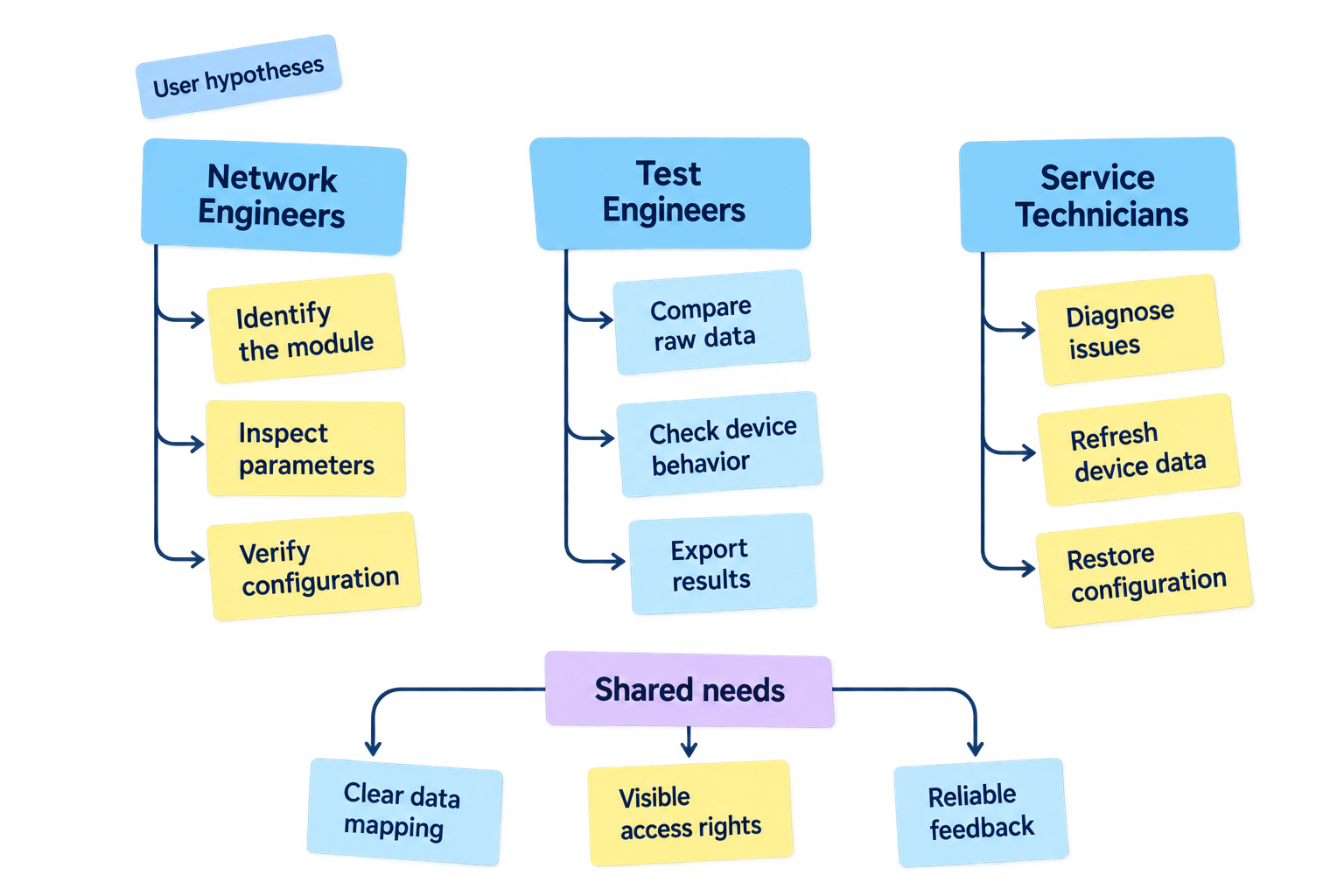
Potential users include network engineers, testers, and service personnel. It is necessary to determine their level of familiarity with the CMIS standard and the frequency with which they work with Hex data.
Key tasks:
- Identify the device and the installed module.
- Read current parameters and memory data.
- Locate a specific parameter and its corresponding bytes.
- Modify permitted values.
- Verify and apply changes.
- Copy or export data for further analysis.
Clarifying What the Interface Doesn’t Show
Before moving into detailed design, we need to clarify user priorities, parameter definitions, memory addressing and API behavior. Key questions include how changes are saved, what restoring defaults affects and how the system handles failed operations.
Resolving these questions with engineering will turn initial assumptions into actionable requirements and help define missing loading, error and recovery states.
| Open Question | Why It Matters |
|---|---|
| Who is the primary user, and what are their most frequent tasks? | Determines the relative priority of the parameter tree and raw data editor. |
| What is the complete parameter map? | Defines addresses, data types, units, valid ranges, encoding and access rights. |
| How are memory pages and banks addressed? | Establishes whether page selection alone covers the required navigation. |
| Does the API write an entire block or only modified bytes? | Affects change tracking, validation and conflict handling. |
| Do access restrictions apply consistently to parameter and Hex editing? | Ensures that raw byte editing cannot bypass write restrictions. |
| What exactly does “Restore Defaults” do? | Clarifies the source of default values, affected parameters and whether restoration requires a separate save. |
| What happens when a write operation fails? | Defines retry behavior, retention of pending edits and the need to read back device values. |
| What does copying or exporting include? | Clarifies the data scope, output format and treatment of unsaved changes. |
| Which loading, unavailable and error states are needed? | Covers scenarios such as a missing module, insufficient permissions and communication failures. |
Defining What the Interface Must Do
The interface should clearly distinguish device values, pending edits and confirmed changes. Users need to understand what they can modify, validate their input and receive clear feedback during read and write operations. Refreshing data or leaving the screen should protect against accidental loss of unsaved work, while consistent keyboard navigation and accessible indicators support precise interaction.
I use AI to extract the key technical requirements regarding functionality from extensive technical documentation.
I used prompt:
Present the requirements in a concise table with two columns:
Area | Functional requirement

Describe what the system must allow users to do, rather than its visual styling. Use clear, implementation-neutral language.

Distinguish directly visible functionality from inferred behavior. Where the screen does not provide enough information, mark the behavior as “To be confirmed” rather than inventing technical details.

Finish with a short list of questions to clarify with the engineering team before finalizing the requirements.

Write in English. Treat the output as a draft reconstructed from the screen, not as a record of validated project requirements.
No colors, gradients, shadows, perspective, 3D effects, people, hardware or logos. Wide landscape composition suitable for a Product Design case study.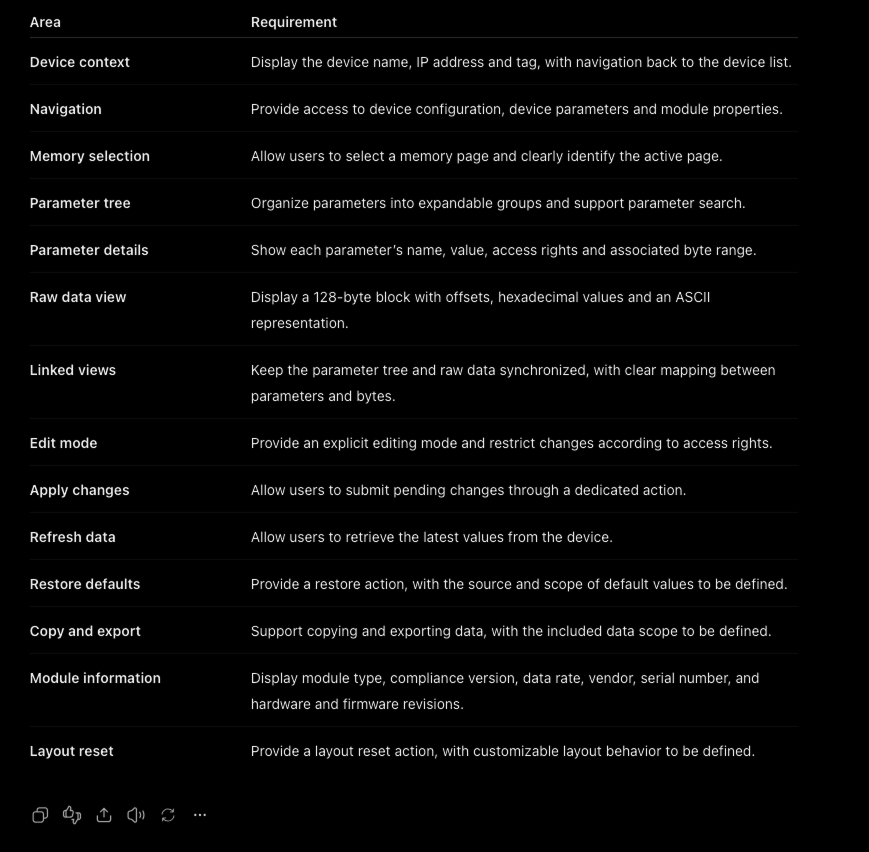
Keeping Users in ControlGiving Every Element a Clear Purpose
I asked AI to design a sketch of the components that would meet these requirements:
Create a black-and-white technical wireframe illustration for a QSFP-DD diagnostics and configuration tool.

Layout:
A large desktop application window divided into three panels:
- Left: “PARAMETERS” — an expandable parameter tree with diagnostic groups, a selected row and RO/RW access labels.
- Center: “RAW DATA” — a hexadecimal byte matrix with row offsets and column addresses. Highlight a small range of bytes.
- Right: “MODULE INFO” — a two-column list of module properties, followed by “SELECT PAGE” and “APPLY” buttons.

Connect the selected parameter to the highlighted bytes with a dashed line to communicate their relationship.

Below the main window, place three numbered detail callouts:
1. “SELECT PAGE” — an expanded memory-page dropdown.
2. “EDIT” — a short row of hexadecimal cells, with one selected cell and a pencil icon.
3. “APPLY” — a checkmark icon and an Apply button.

Use thin dashed leader lines to connect the callouts to the relevant controls.

Visual style:
Precise engineering drawing, flat front view, fine black outlines, white background, restrained gray selection fills and monospaced typography for byte values. Maintain consistent spacing, clear hierarchy and generous margins.

Use illustrative sample data. Prioritize legibility and structural clarity over decorative detail.

No colors, gradients, shadows, perspective, 3D effects, people, hardware or logos. Wide landscape composition suitable for a Product Design case study.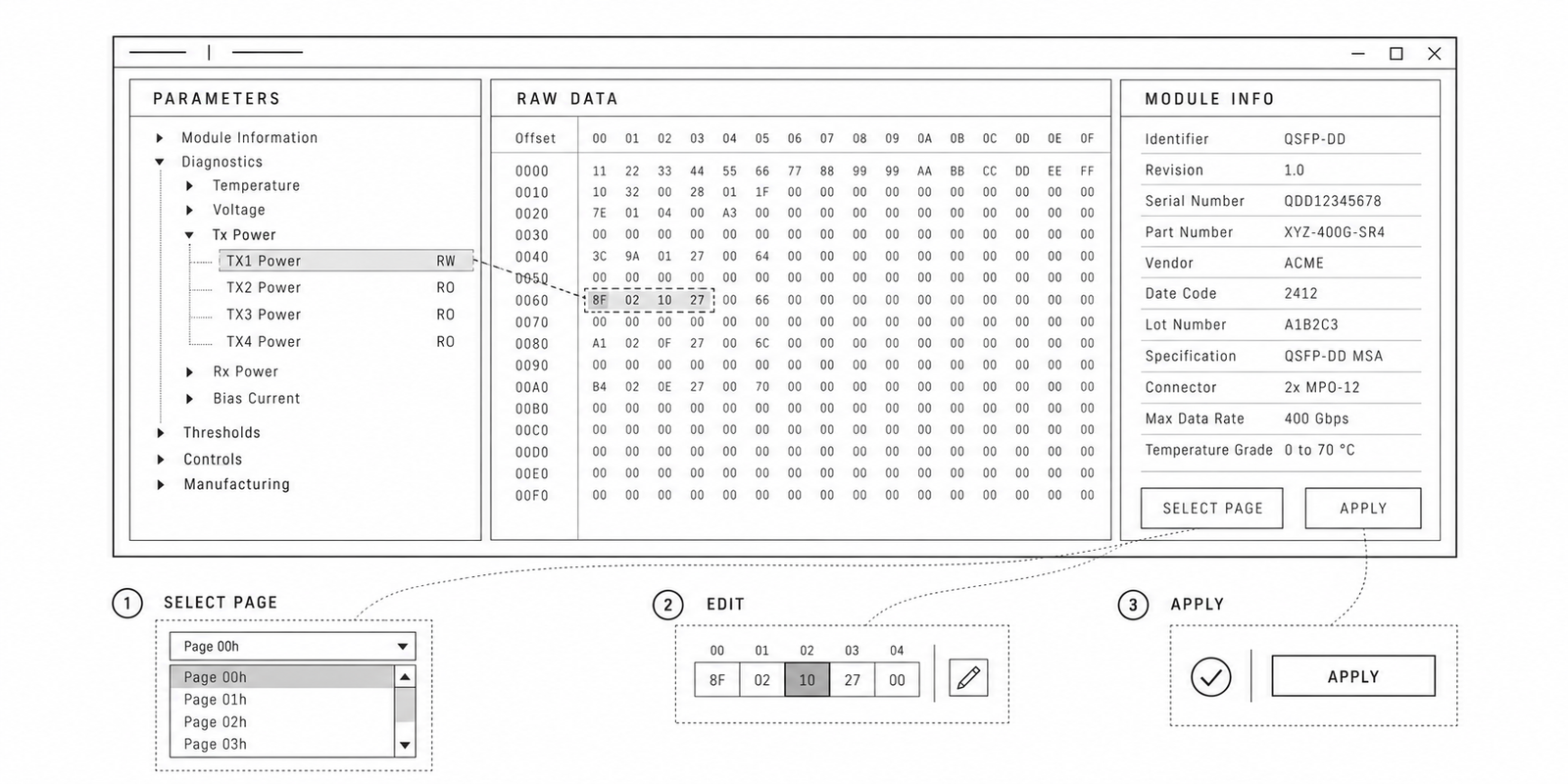
Making Complex Module Data Understandable
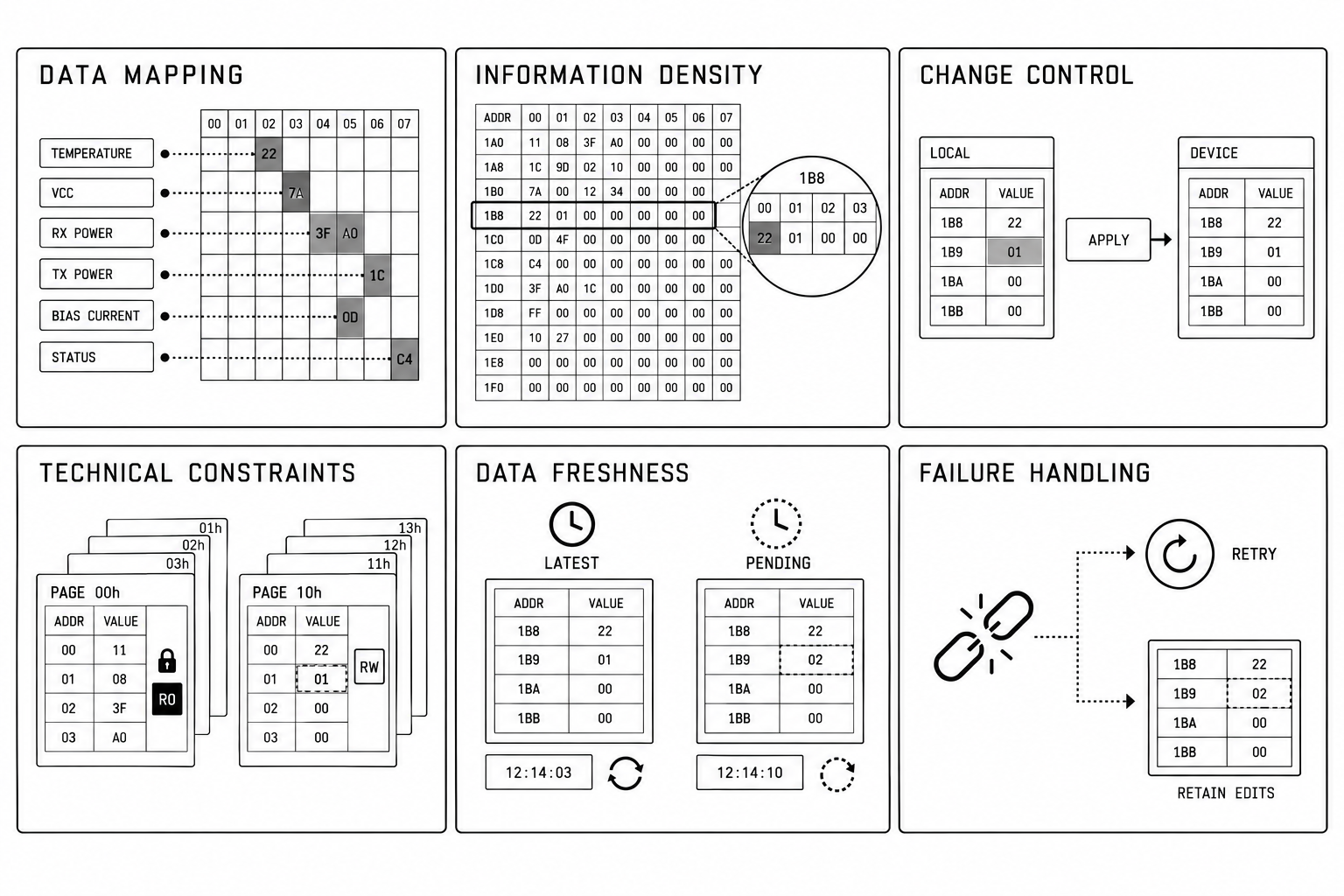
Engineers need to inspect and configure QSFP-DD modules using both readable parameters and raw hexadecimal data. Working between these representations can make it difficult to locate values, understand their relationships and identify what can be edited.
The design goal was to bring both views into one workspace, making data easier to interpret and configuration changes easier to control.
| Design Challenge | What Needs to Be Addressed |
|---|---|
| Two representations of the same data | Make the relationship between readable parameters and raw bytes clear, including values that span multiple bytes. |
| High information density | Support efficient scanning and comparison without compromising readability. |
| Control over changes | Clearly distinguish local edits from changes written to the device. |
| Technical constraints | Account for parameter availability and edit permissions that may depend on the module, memory page and device state. |
| Data freshness | Distinguish the latest device readings from older data and pending local changes. |
| Failure handling | Define clear recovery paths for connection loss, rejected writes and partially completed operations, where supported. |
Connecting Parameters, Raw Data and Actions
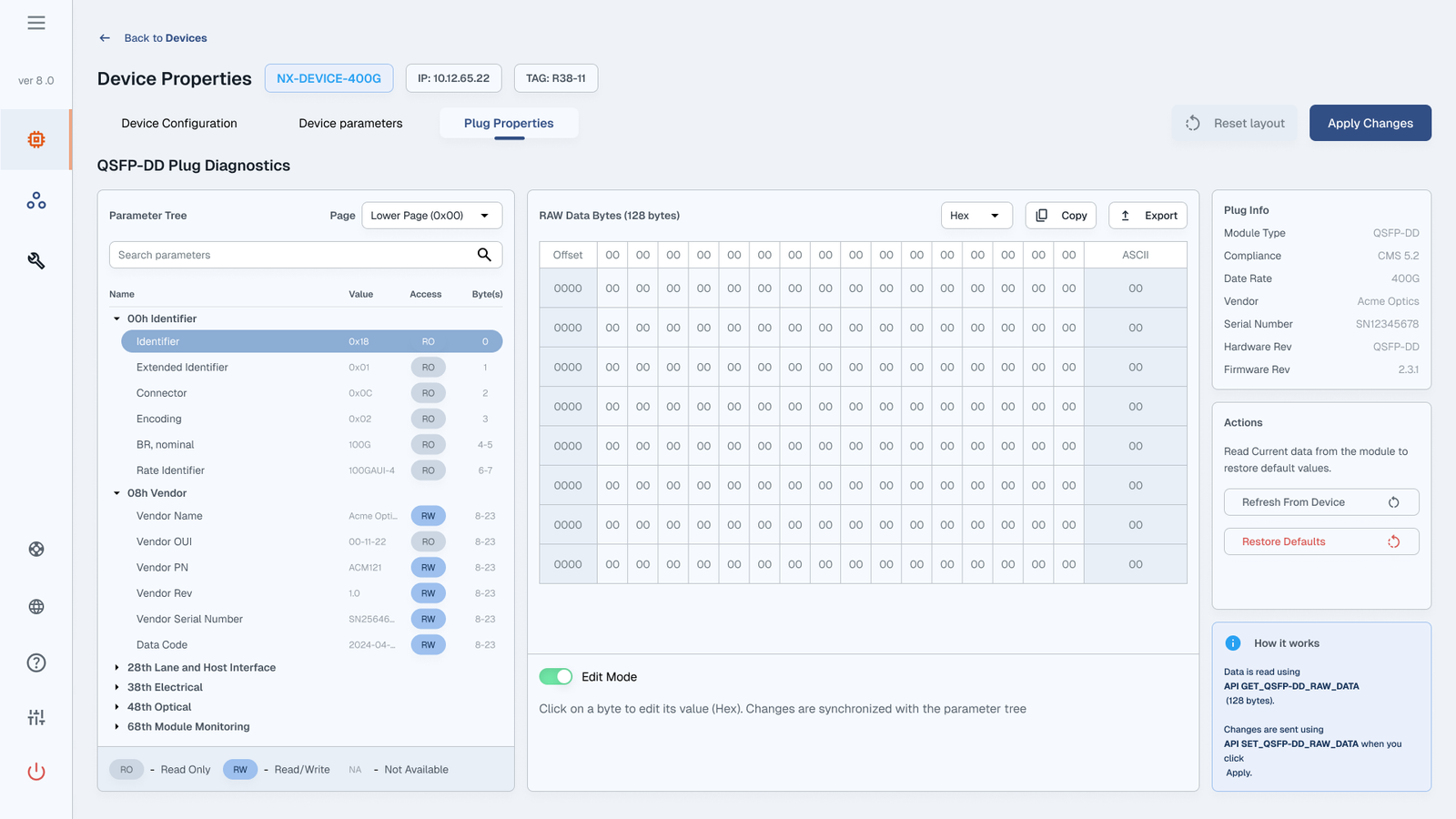
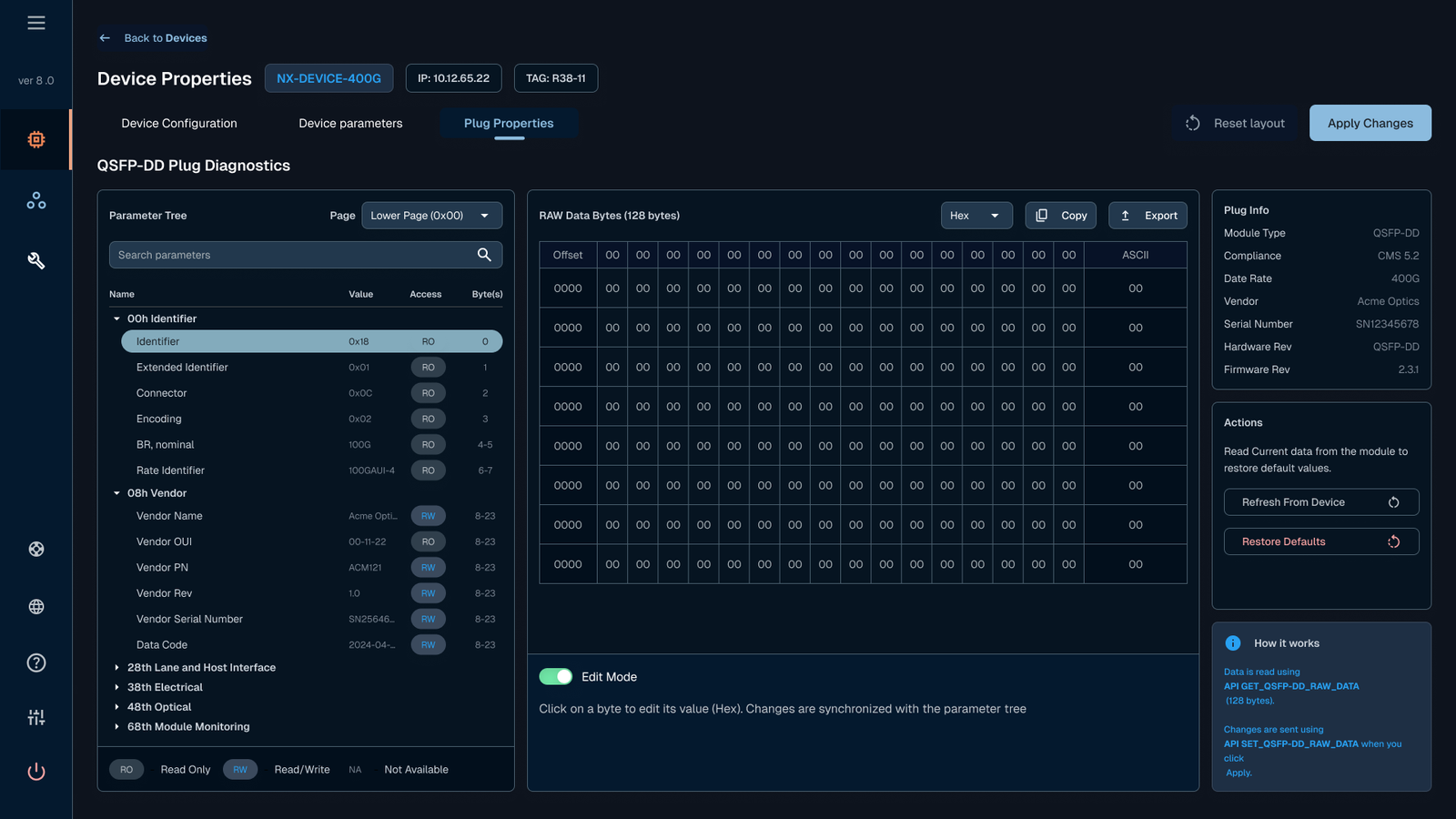
The final interface brings parameter exploration, raw memory data and module information into a single workspace. Its three-panel layout supports a clear workflow: identify the module, locate a parameter, inspect its associated bytes and prepare changes for submission.
Design Rationale
| Design Decision | Why I Chose It |
|---|---|
| Three-panel workspace | To keep parameters, raw data and module details visible together, reducing the need to switch views. |
| Expandable parameter tree | To organize technical information into manageable groups while allowing users to explore specific details. |
| Parameter search | To give users a direct route to a known parameter without manually browsing every group. |
| Parameters alongside raw bytes | To support both readable interpretation and low-level inspection within the same context. |
| Visible access labels and byte ranges | To make editing permissions and memory locations explicit. |
| Memory page selector | To provide direct access to different memory pages while keeping the active selection visible. |
| Explicit Edit Mode | To separate inspection from editing and make the interaction mode clear. |
| Dedicated Apply Changes action | To separate preparing edits from submitting them to the device. |
| Persistent device and module information | To help users verify which hardware they are inspecting before making changes. |
| Grouped refresh and restore actions | To keep device-level operations accessible and separate from individual parameter edits. |
| Copy and export controls | To support further analysis, troubleshooting and sharing diagnostic data. |