UX/UI Project - Yach HMI Screen
Project Overview
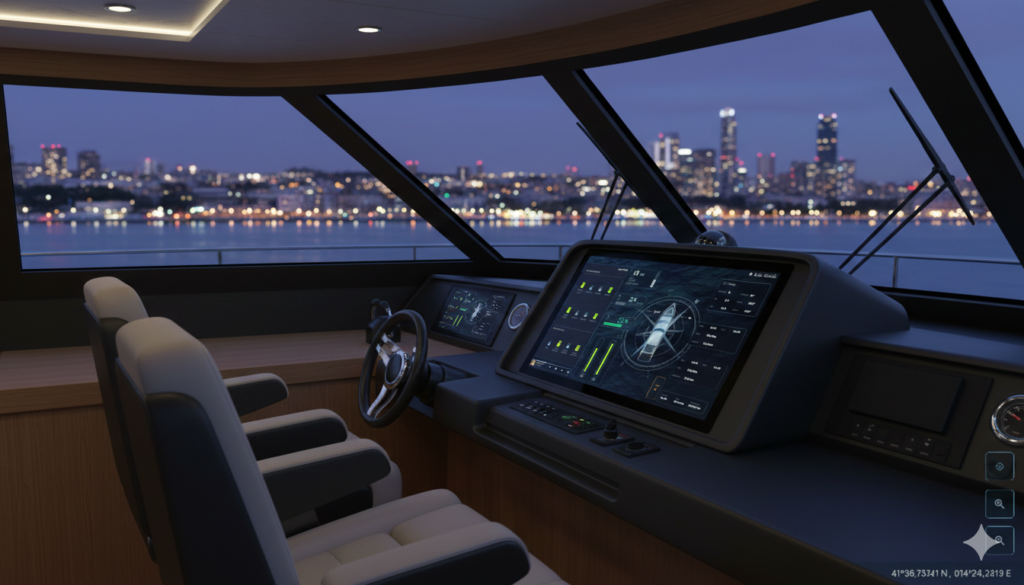
This UX project showcases a sophisticated, dark-themed Integrated Marine Command Suite designed for a modern yacht cockpit. The interface prioritizes high-contrast visibility for night or direct-sunlight navigation, using a sleek "Glass Morphism" aesthetic with vibrant neon accents (electric lime) for critical data visualization. The challenge was to design a product that transforms complex data into clear insights while ensuring a seamless, intuitive experience for non-technical users.
Industry
Automotive
Qt Technology
Tools
Figma
Jira
Adobe Illustrator
AI
The Primary User: High-Net-Worth Individuals (HNWI)
This project is designed for luxury yacht owners who likely operate the vessel themselves or want to stay informed while the crew manages it.
The „Tech-Savvy Captain”: Someone who appreciates a „Tesla-like” experience on the water. They want a sleek, modern aesthetic that matches the luxury of their vessel.
Need for Simplicity: Despite the complexity of boat systems, they require an intuitive interface that doesn’t feel like a legacy industrial machine.
Lifestyle Integration: They value having their music (Radio screen) and climate controls (AC screen) integrated directly into the navigation flow.
The Professional User: Yacht Captains and Crew
For the people whose job is to ensure the safety of the vessel and its passengers.
Critical Monitoring: The „Engine” and „Radio” screens target the need for precise, real-time telemetry during long-haul voyages.
Safety & Reliability: The high-contrast dark mode is specifically targeted at reducing eye strain during night navigation and preventing screen glare in open-sea sunlight.
Split-Second Decision Making: The modular design allows a captain to see fuel, depth, and wind direction at a single glance without digging through menus.
The B2B Market: Luxury Marine Manufacturers (OEMs)
This UI acts as a premium selling point for high-end boat builders (e.g., Azimut, Sunseeker, or Princess Yachts).
Brand Differentiation: Boat manufacturers can use this bespoke UI to differentiate their vessels from competitors who use standard, „off-the-shelf” Garmin or Raymarine interfaces.
Smart-Home on Water: It targets the „Smart Vessel” trend, where the boat’s hardware is seamlessly tied to a digital ecosystem.
Primary Dashboard & Navigation
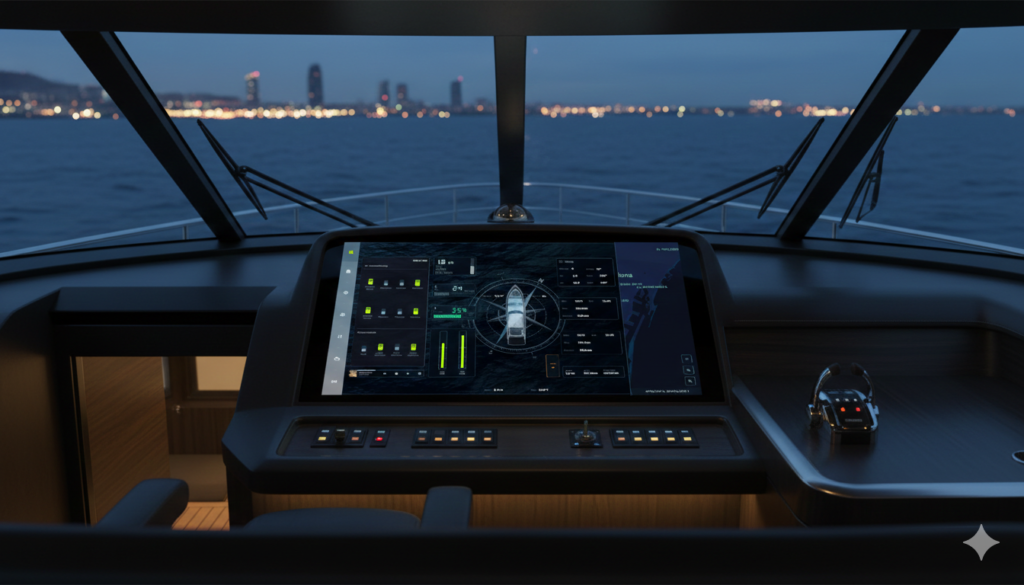
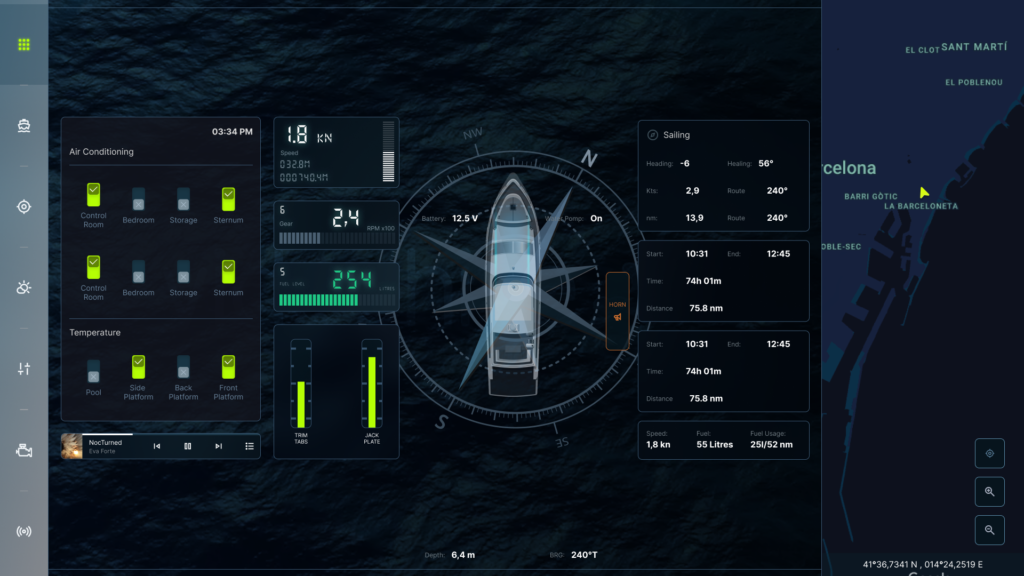
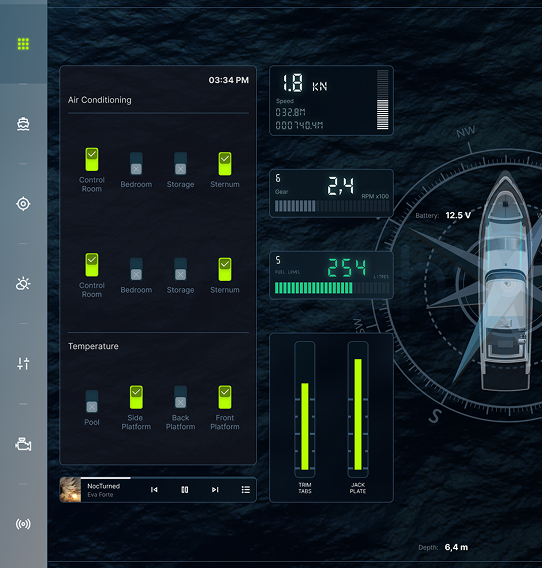
Central Compass & Hull Overlay: Provides a spatial representation of the boat’s orientation, battery levels, and water pump status.
Dynamic Telemetry: Real-time tracking of speed (knots), gear position, RPM, and fuel levels using both digital readouts and tactile bar graphs.
Journey Tracking: Dedicated modules for „Sailing” stats and trip duration/distance logs.
Environmental & Vessel Controls
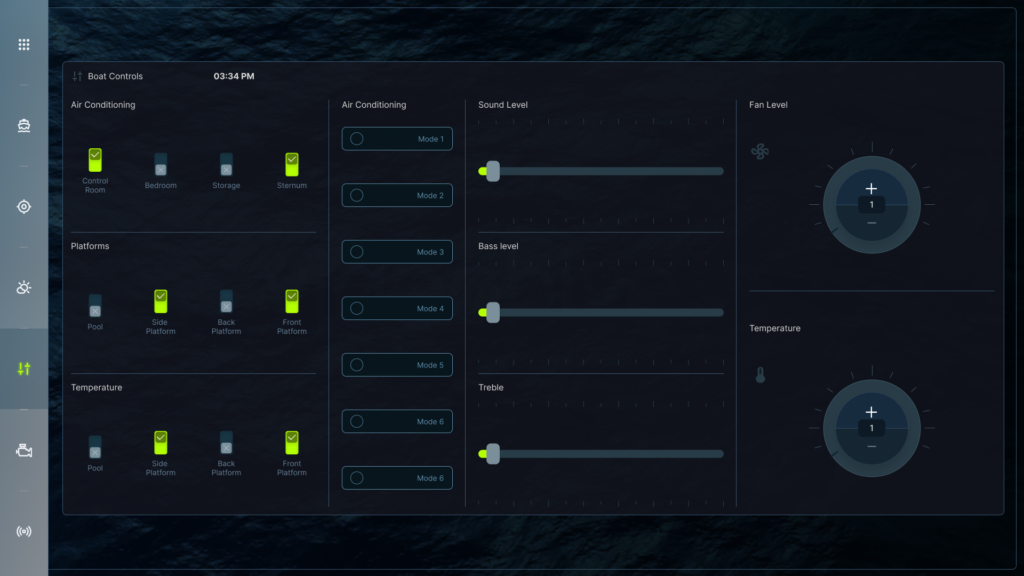
Zonal Climate Control: Simple toggle interface for AC and heating across specific cabins (Control Room, Bedroom, Storage, etc.).
Platform Management: Visual switches for hydraulic side, back, and front platforms.
Precision Sliders: Vertical and horizontal sliders for Sound, Bass, and Treble, alongside rotary-style dials for Fan Level and Temperature.
Engine Diagnostics (Performance Mode)
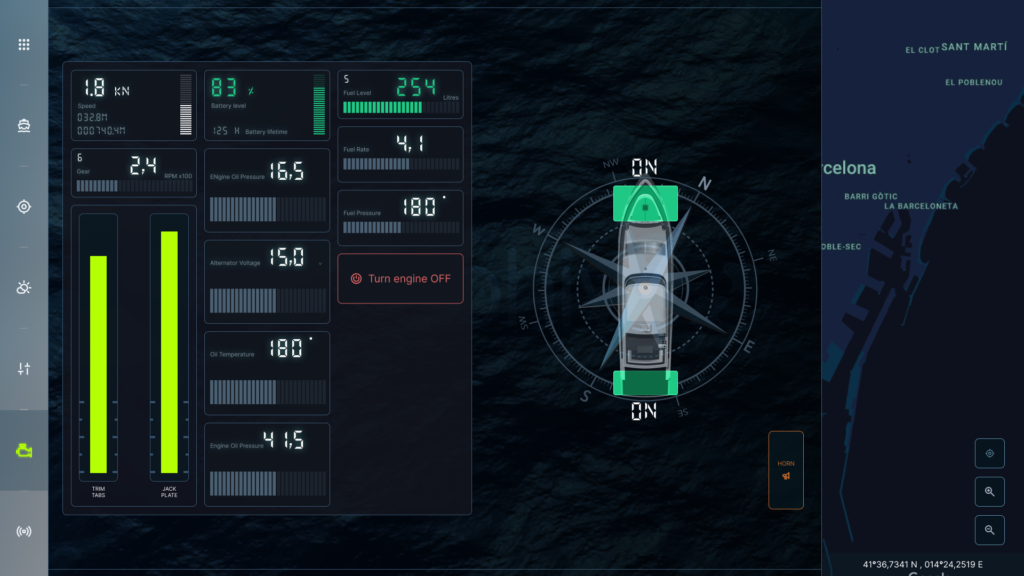
Critical Systems: Deep-dive metrics including Engine Oil Pressure, Alternator Voltage, and Fuel Pressure.
Safety Features: A prominent „Turn Engine OFF” emergency button with high-contrast red styling.
Trim & Jack Plate: Large vertical gauges for physical boat leveling and motor height.
Weather & Global Mapping
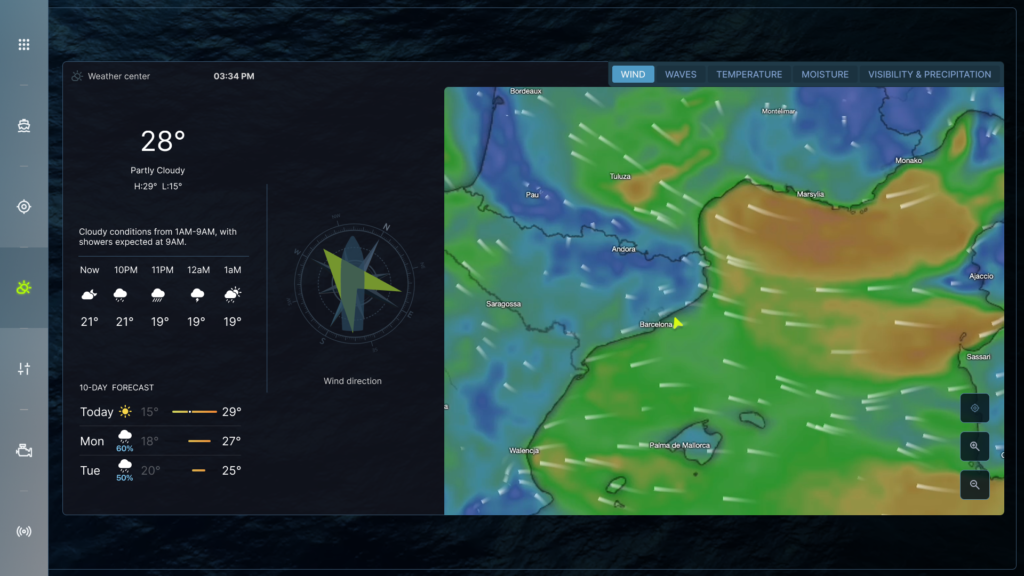
Meteorological Overlay: 10-day forecasts integrated with a live wind/wave map.
Wind Direction Compass: A dedicated visualizer for wind tacking, essential for sailing efficiency.
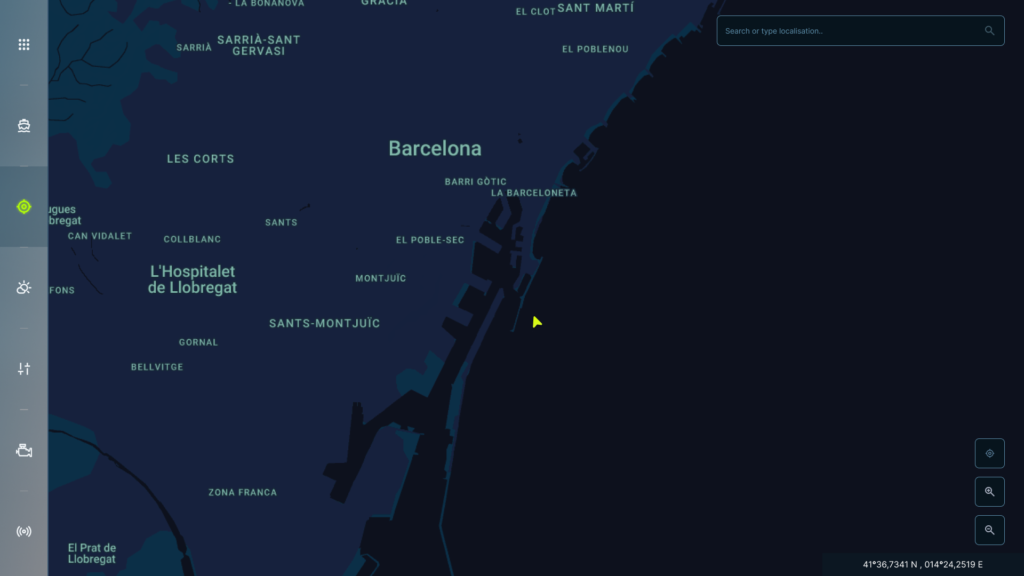
Interactive Cartography: A full-screen map interface (centered on Barcelona) with search functionality and coordinate tracking.
Media & Communication
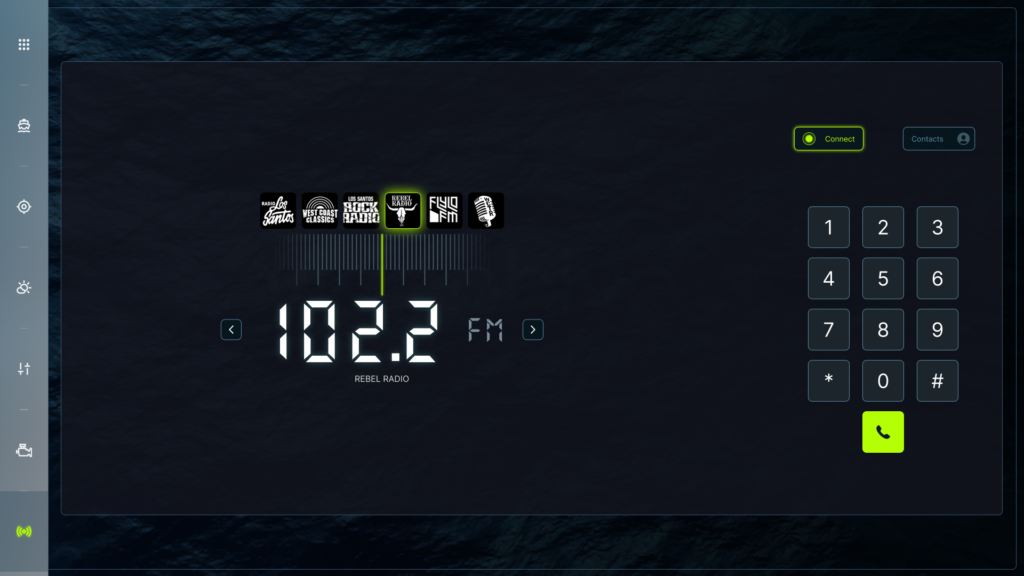
Integrated Radio: A skeuomorphic „tuner” interface featuring presets (like Rebel Radio, FlyLo FM) and a digital keypad for satellite calls or frequency input.
Contextual Mini-Player: A persistent media bar at the bottom of the main dashboard for quick track skipping without leaving the navigation screen.
UX Highlights
Mode-Based Sidebar
A persistent left-hand navigation rail allows for one-tap switching between Map, Boat Stats, Lighting, Controls, Engine, and Media.
Spatial Awareness:
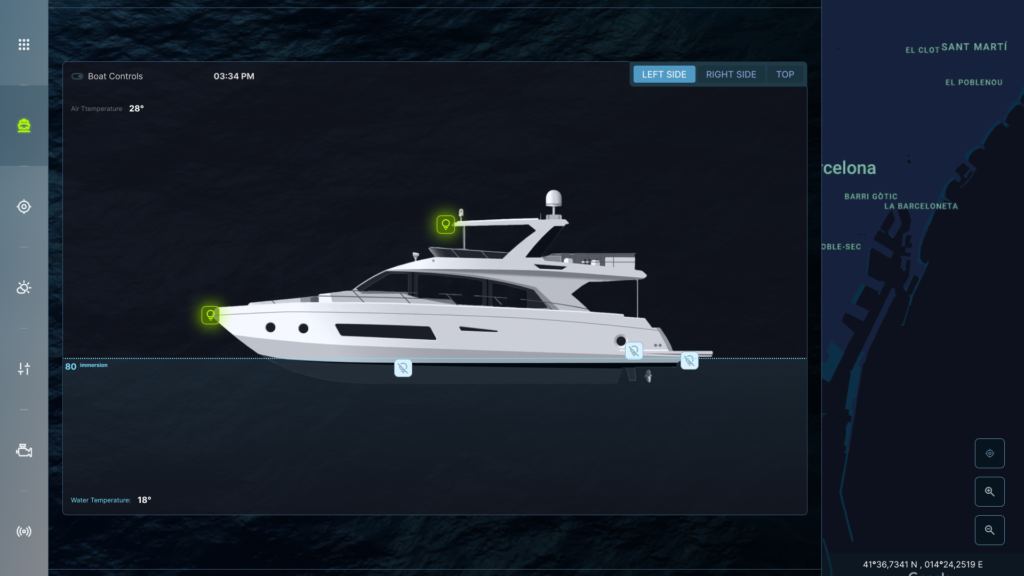
The "Dashboard" screen provides a 3D profile of the vessel to manage exterior lighting and monitor immersion depth (80% immersion indicator).
Redundancy
Data like speed and heading are mirrored across multiple screens to ensure vital info is never hidden.
The UX Solution: "The Adaptive Command Bridge"
The core solution is a Context-Aware Interface that changes its density and functionality based on the boat’s current state (Docked, Cruising, or Night Sailing).
1. Adaptive Layouts (Contextual Intelligence)
The UI shouldn’t look the same when you’re entertaining at the dock versus navigating a storm.
Docked Mode: Prioritizes Environmental Controls (AC, Lighting, Music, and Platforms). The navigation data recedes to make room for guest comfort settings.
Navigation Mode: Transitions to a Telemetry-First view. The central compass expands, and engine vitals (RPM, Oil Pressure) move to primary positions.
Night Mode: Automatically shifts to a „True Dark” palette, replacing the neon lime with deep reds/ambers to preserve the captain’s night vision (scotopic vision).
2. Solving „Touch Fatigue” (Haptic & Gesture Integration)
Touchscreens can be difficult to use in choppy waters.
Large Target Areas: The solution uses oversized buttons and sliders (seen in the Controls.png) so that even if the boat is rocking, the user can successfully hit the target.
Edge Gestures: Swiping from the left always brings up the „Mode Rail,” and swiping from the bottom opens the „Emergency/Horn” quick-access panel, regardless of which screen is active.
3. Safety-First Information Architecture
Critical Thresholds: The „Engine” screen (seen in Radio.png) doesn’t just show numbers; it uses Visual Anchors. If the oil temperature exceeds 180∘F, the gauge doesn’t just change color—it triggers a persistent „System Alert” overlay on all screens.
Redundancy: Vital stats (Depth and Bearing) are pinned to the bottom status bar across the Map, Engine, and Weather screens so the captain never loses situational awareness.
📊 Technical Feature Set
| Feature | User Benefit |
| Zonal Synchronization | Control climate and audio for 4+ areas from a single „Master” screen. |
| Live Weather Overlay | Combines wind direction vectors with GPS routes to suggest fuel-efficient paths. |
| 3D Vessel Health | A profile view (Dashboard-2) that visualizes bilge pump activity and exterior light status. |
| Unified Communication | Integrated VHF radio and satellite calling directly into the media hub. |
Testing Strategy: The "Three-Tier" Approach
1. The Lab: Static Usability Testing
Before the software ever touches a boat, you must verify the Information Architecture and Target Sizes.
The „Shake” Test: Users try to interact with the screen while sitting in a chair that is being vibrated or moved. This identifies buttons that are too small for choppy water.
Fitts’s Law Audit: Ensure that the most critical actions (like „Turn Engine OFF”) have the largest click-targets and are placed in the easiest-to-reach areas (bottom or sides of the screen).
Glanceability Study: Show a screen (e.g., Engine Stats) for only 2 seconds. If the user can’t tell you the speed and fuel level immediately, the UI is too cluttered.
2. The Simulation: Environmental Stress Testing
This phase tests the Visual Design under maritime environmental constraints.
Sunlight Readability: Test the interface under 50,000+ lux (simulated direct sunlight). Does the „Electric Lime” maintain enough contrast against the dark background?
Night Vision Preservation: Verify that the „Night Mode” uses specific wavelengths (reds/deep ambers) that do not „bleach” the captain’s rhodopsin, allowing them to see both the screen and the dark horizon.
Glove & Wet-Touch Testing: Use projected capacitive (PCAP) screens to ensure swipes and taps work even when the screen is covered in salt-spray or when the captain is wearing 5mm neoprene gloves.
3. The Field: Sea Trials
Real-world testing with professional captains (the „Target User”).
Cognitive Load Assessment: Monitor a captain during a docking maneuver. If they have to look away from the water for more than 1 second to find a control, that feature needs optimization.
Emotional Mapping: Does the interface provide „relief” or „anxiety”? Stable, predictable data placement (e.g., keeping the compass in a fixed position) reduces stress in unpredictable seas.
📈 Optimization Roadmap
Technical Optimizations
Dynamic Dimming: Use ambient light sensors to adjust brightness automatically between 1 and 1000 nits.
Haptic Feedback: Since tactile „clicks” are missing on a flat screen, add vibration or audible „pings” to confirm that a command (like lowering the platform) has been received.
Redundancy Logic: If a sensor fails (e.g., GPS), the UI should automatically prioritize secondary data (Compass/Dead Reckoning) and highlight it in an „Alert” color.